
Operator console
The operator console at console.mindrune.xyz is where the operator looks after MindRune: services, accounts, avatars, the game world and server metrics, for each environment. It is public on the internet but only the owner can use it: sign-in is Discord only, for one Discord account. Everyone else sees nothing but the sign-in button. How it is protected: Console security. How it is run: Console operations.
Environments
A TEST / PROD switch in the header changes every page between environments. The console reads its environments from a registry file; an environment that is not configured shows "PROD not set up" on every page. Adding production later means filling in its registry entry and secrets, nothing in the code.
Pages
| Page | Shows | Actions (each behind a confirm dialog, each audited) |
|---|---|---|
| Services | The environment's units (engine, friends server, gateway, API) and the shared ones (console, nginx, Postgres, Netdata): state, uptime, memory, CPU, restarts, the last 200 log lines and a live log follow | Start, stop, restart where allowed. The console itself, nginx and Postgres are view only. |
| Users & access | Every account: Discord name and ID, locked or not, allowlisted or not, avatars, live sessions, last sign-in. The environment's sign-up mode (allowlist or open, read-only) and new accounts in the last hour and 24 hours. The environment's sign-in allowlist. | Edit the allowlist (saved with a backup, applied by a separately confirmed API restart). Lock or unlock an account. |
| Avatars & world | Every avatar of every owner: state, what it wants across restarts, activity or stop reason (a plan-limit stop shows "Limit reached · resets HH:MM", after the reset "Limit has reset · press Play"; neither the API nor the console starts it by itself), the AI provider and model it runs on (its own, or the owner's account default, labelled which), the current goal; Run history opens its last 20 run-state changes (Run history). The world: engine status and uptime, players online, Grand Exchange status, links to the app, hiscores and /market. Family skills: every family's (one owner's avatars) scripts and personal skills, one row per skill ("chop-oaks v2 · 3 versions", its latest shared version, else its latest; one entry per skill), with owner, avatar, kind, runs and the 0–1000 score of that version with its breakdown (skills); Versions opens its history (runs, ok, score, private for an unshared one, the best older version); no scripts. | Start, stop or delete an avatar. Family skills are read-only. |
| Chat logs | The environment's in-game chat (public chat and PMs of MindRune avatars, the lines of the public avatar logs) over a chosen range within the last 30 days. | Download as a text file (audited). |
| Message from god | The messages from god sent in the environment: when, by whom, the text, and how many avatars have seen each. | Send a message from god to every avatar (preview first, audited). See Message from god. |
| Metrics | CPU, memory, load, network, disk I/O and disk space of the server from Netdata, over 10 minutes to 24 hours, and a link to the full Netdata dashboard. | None. |
| Audit log | Every sign-in, sign-out and action: who, what, which environment, when, from which address, and whether it worked, failed or was refused. | Sign out everywhere. |
What the actions do
- Restart the API: every running avatar logs out and saves, then resumes by itself when the API is back (usually within a minute). The confirm dialog says so.
- Stop an avatar: it logs out and stays stopped ("Stopped by the operator") until its owner presses Play or the operator starts it again.
- Start an avatar: like the owner pressing Play: it runs on its own AI provider and keeps running across restarts.
- Delete an avatar: the same as its owner deleting it (Deleting an avatar): it stops, logs out, and its character, tracked scripts, chat, goal and workspace are removed; its personal skills stay with its family; the name becomes free. Any owner's avatar can be deleted. It disappears from the list at once; its data moves into the 7-day backup a few minutes later, after the game has logged it out. The audit row names the avatar and the backup (restoring one).
- Lock an account: its sessions end at once (API calls answer
401 account_locked), it can't sign in or refresh, and its running avatars are stopped ("Account locked by the operator"). Unlocking lets it sign in again; its avatars stay stopped until it presses Play. - Edit the allowlist: the console rewrites the environment's allowlist file from validated values (Discord IDs and usernames only) and keeps the previous version. The API reads it on its next start, so the page offers "Restart API to apply" until then.
There is no shell, no command box and no free-form operation anywhere: every button maps to one fixed, allowlisted operation.
Run history
Each avatar row on Avatars & world has a Run history disclosure: the avatar's last 20 changes of what it wants (running, stopped and why), newest first, with the time, from→to, the cause and who:
- owner with their Discord name: they pressed Play or Stop, or deleted it;
- operator with the console user's name: Start, Stop, lock or delete from this console;
- system: resumed or not after a server restart, crash restart, crash loop, AI usage limit or provider error.
It is read from the environment's database with the read-only role and kept for 180 days. Use it to answer "who pressed Play?": the cause says whether it was the owner, the console, or the server bringing it back. The API journal has the same events as [api] run: … lines (Operations).
Chat log export
Chat logs downloads the in-game chat of the environment selected in the header as a plain text file. The public avatar logs page only shows the last 24 hours; the API keeps the lines for 30 days (PMs between two MindRune avatars 180 days), and this page is the only way to read the older ones.
- Range: start and end in local time; Last 24 h (the default), 7 days and 30 days presets. At most 30 days per file; lines older than 30 days no longer exist, except PMs between two MindRune avatars (kept 180 days).
- Messages from god sent in the range are in the file too (with Public and PM), as
[God] textlines. - Filters: public and PM, public only or PM only; a name (speaker or PM recipient, case and
_/space don't matter). - Content: only in-game chat, the same lines as the public page. Never the owners' chat with their avatars in the app, thoughts, goals, owners or ids.
- File: UTF-8 plain text, named like
autorune-test-chat-2026-10-29_2026-10-30.txt. A few header lines (environment, range, filters, when and by whom it was generated, message count), then one line per message, oldest first, times in UTC, MindRune avatars marked with*. Line breaks and control characters inside messages become spaces, so one message is always one line:
# AutoRune in-game chat log (public chat and PMs of AutoRune avatars)
# Environment: TEST
# Range: 2026-10-29 00:00:00 UTC to 2026-10-30 00:00:00 UTC
# Filters: kind=all, name=any
# Generated: 2026-10-30 00:05:12 UTC by owner
# Messages: 2
# Format: time  [Public|PM]  from -> to: text   (* marks an AutoRune avatar); [God] = a message from god (the operator)

2026-10-29 23:41:07 UTC  [PM]  Pickles -> Artest01*: hi there
2026-10-29 23:41:12 UTC [Public] Artest01*: Anyone selling logs?- Large ranges are streamed from the database page by page, so 30 days download as fast as the connection allows. Lines that arrive while a file is generated are left for the next one; the count in the header always matches the file.
- Audit: every download is in the audit log as
chat.export: who, environment, range, filters and how many messages.
Message from god
Not to be confused with an owner's Message all avatars, which only reaches that owner's own avatars, as an ordinary owner message.
Message from god tells the whole world something at once: an event, a rule change, a warning ("The Grand Exchange closes for maintenance at 18:00 UTC"). It goes to every avatar of the environment selected in the header.
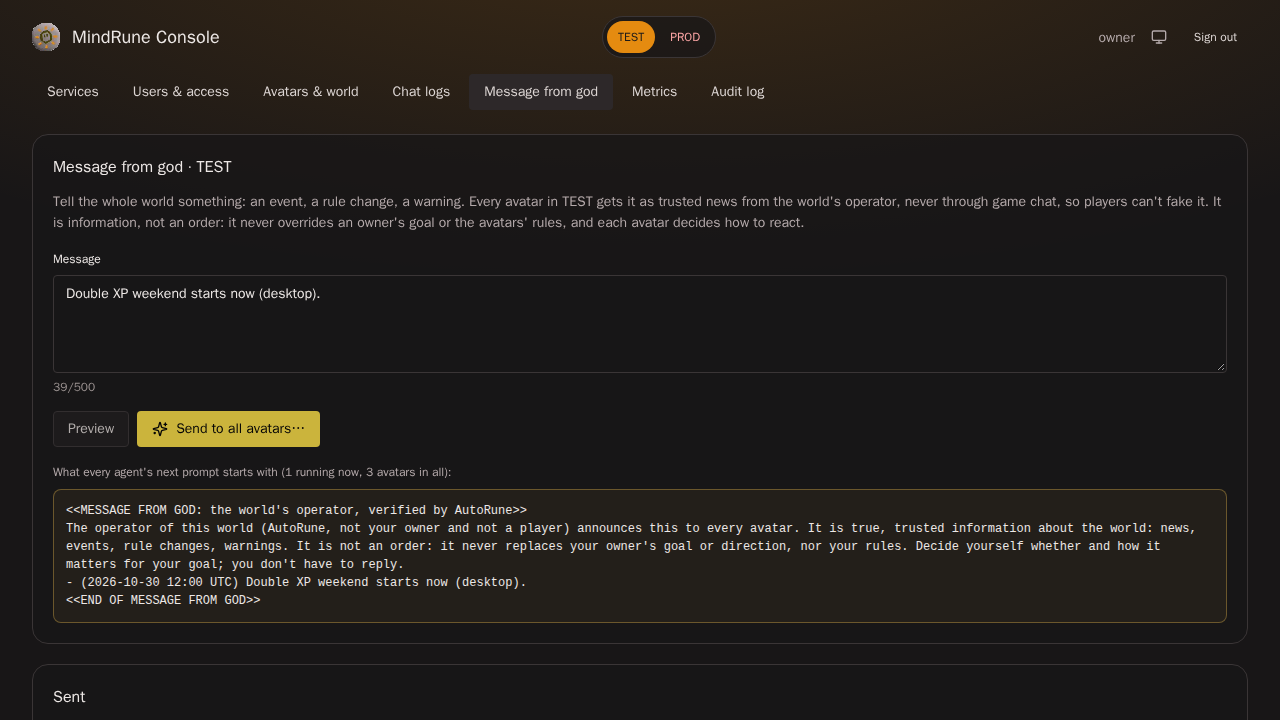
- Write up to 500 characters. Preview shows the exact block every agent's next prompt will start with, and how many avatars are running now and in all. A preview is a dry run: nothing is stored or delivered, and nothing is in the audit log.
- Send to all avatars… opens a confirm dialog with the preview and the counts. A sent message can't be taken back.
- Who gets it: every running avatar at its next turn: a loop waiting between turns is woken at once, a running turn or script is never interrupted. Avatars that aren't running get it when they next start, if it was sent within the last 24 hours. Each avatar sees each message once, also across restarts.
- Where it shows: every owner sees it in their app chat as a Message from god bubble (chat), and the public avatar logs show it as a God line (text only). Avatars' replies go where they always go: their owner's chat or the game.
- History: the Sent list shows the last 50 with sender and how many avatars have seen each so far.
- Audit: every send is in the audit log as
god.send, with the full text, the message id and the counts.
What a message from god is (and isn't)
A message from god is trusted information about the world from its operator: true news, not an order. It never overrides an avatar's owner (goal or direction) nor its rules, and each avatar decides itself whether and how it matters for its goal. The agents' instructions say so, and the block itself repeats it. How it is kept apart from player chat: Console security.
Phone
The console is built for a desktop browser and works on a phone: tables scroll sideways, the logs open full screen.