
AI providers and engines
Every owner brings their own AI. MindRune never pays for inference, and there is no global or fallback key. Providers are set in two steps:
- Connect each provider once, in Settings → AI providers: sign in or paste a key. Every connected provider is listed there with its status; Reconnect (or Sign in again) fixes a failing one, Disconnect (or Sign out) removes it. This is the only place keys and sign-ins live.
- Pick a provider and model per avatar, in the app's Settings → AI for avatar (under the avatar grid) or on its dashboard page → Settings (per-avatar provider). The provider list shows only connected providers.
Picking a provider for an avatar never deletes a key; only Disconnect removes one.
The options
| Option | How you connect | Engine | Models |
|---|---|---|---|
| OpenRouter | Connect with OpenRouter (OAuth with PKCE: OpenRouter creates a key labelled "MindRune" that you can revoke there), or Paste API key (sk-or-…, from openrouter.ai/settings/keys). Both work the same afterwards; Settings shows which one you used next to the key's last 4 characters. | opencode | Any model OpenRouter lists that can call tools, loaded live from OpenRouter (below). Default: Claude Sonnet 5.5 |
| Anthropic (API) | Paste an API key | opencode | A curated list |
| OpenAI | Paste an API key | opencode | A curated list |
| Google Gemini | Paste an API key | opencode | A curated list |
| Claude subscription (via Claude Code) | Sign in with your Claude Pro/Max account through Claude Code's own login | Claude Code | sonnet (default), opus, haiku |
| ChatGPT subscription (via Codex) | Sign in with your ChatGPT Plus/Pro account through Codex's own device-code login | Codex | GPT-6.1 Sol (default), GPT-6.1 Terra, GPT-6 Luna (lightest on your limits), GPT-6 Astra (heaviest) |
OpenRouter models
The OpenRouter model list comes straight from OpenRouter's public model catalogue, so a new model can be picked as soon as OpenRouter offers it, without an MindRune update.
- What's listed: models that read and write text and support tool calling (avatars play by calling tools), with a fixed per-token price. Left out:
:batchvariants (only for OpenRouter's offline Batch API) and routers with a variable price such as Auto Router. - Free models: OpenRouter's
:freevariants (for examplegoogle/gemma-4-31b-it:free) are listed too, with price "Free" and a Free · rate-limited badge; search "free" to see them all. They cost nothing but OpenRouter allows only a few requests per day on them (50 a day, or 1000 once you have bought at least 10 credits; 20 a minute: OpenRouter limits). An always-on avatar makes many requests, so it can stop with "Limit reached" quickly; it stays stopped until you press Play. - Recommended, pinned at the top: DeepSeek V4.1 Flash 1017 (best value), GPT-6.1 Terra (best quality), Claude Haiku 5.5 (cheap), Claude Sonnet 5.5. Everything else is below, sorted by name.
- Picker: the avatar's dashboard page → Settings → AI for avatar (with OpenRouter as the avatar's provider) shows the current model with its price. Tap it to search all models by name or id. Each row shows the price per 1M tokens (input · output) and the context size.
- Freshness: the server keeps the list for an hour and refreshes it in the background. If OpenRouter can't be reached, it keeps serving its last copy (up to a day), or else a short built-in list.
- Your choice stays: only models in the list can be picked. If OpenRouter later drops the model you saved, it keeps being used and Settings marks it "not listed anymore" until you pick another. If OpenRouter stops serving it, the avatar stops with "Model not available" (see below).
Pasted keys are checked with a cheap, free call to the provider before they are saved (for example, listing models; for OpenRouter, reading the key's own info). A rejected key, an empty balance or an unreachable provider is reported and nothing is saved. Validation is rate-limited per user. Replacing a provider's key (pasting a new one, or signing in to OpenRouter again) keeps your avatars on it with their models.
Per-avatar provider
Each avatar runs on its own provider and model, for example a cheap model for a gatherer and a strong one for a quester. In the app's Settings → Avatars, select it: AI for name under the grid is its picker (you stay in the game). The same picker is in the Settings section of its page on your dashboard (the 👁 on its row). AI for name has:
- Provider: one of your connected providers, including Claude subscription and ChatGPT subscription (one login each, shared by all your avatars). To add one, connect it under AI providers first.
- Model: that provider's models (OpenRouter's live list with its Recommended group and search; the others' curated lists). A newly picked provider starts on its default model (or the model it had before).
Each change is saved at once (a check mark shows it). Each card in the app's avatar grid, the selected avatar's AI for line under it and the avatar's dashboard row show what it runs on, model first: "GPT-6 Luna · OpenRouter", or "No AI" when it has no provider yet.
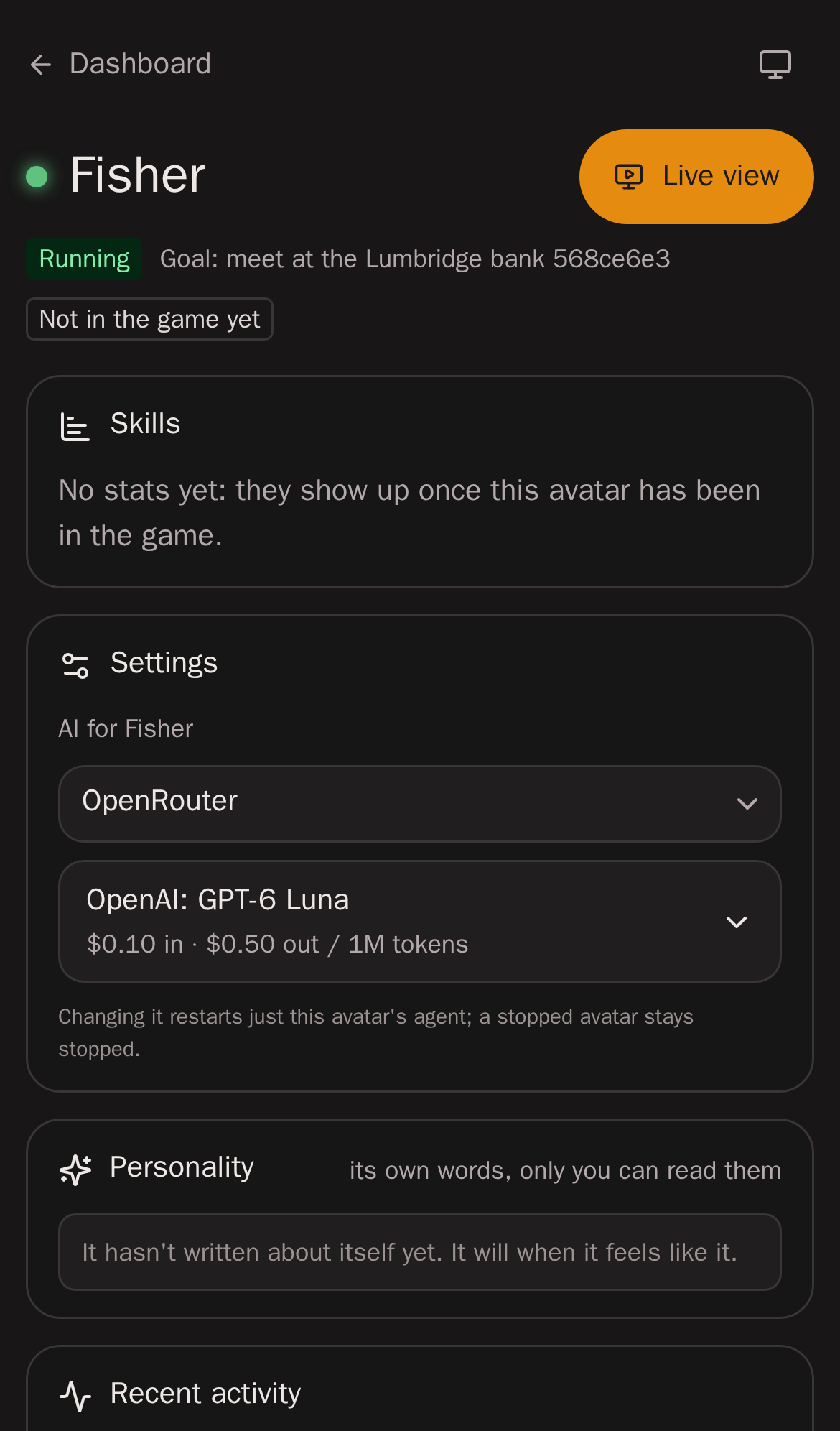
- Only that avatar changes. Saving restarts just that avatar's agent on the new config if it is running; your other avatars keep running untouched. A stopped avatar stays stopped and starts on the new choice when you press Play.
- Keys stay per account. An avatar points at one of your saved providers; the key is still stored once, encrypted, and only that avatar's runner gets it while it runs.
- Removing a provider avatars use asks first ("Fisher runs on OpenRouter…"); afterwards those avatars have no AI (a running one idles) until you pick another provider for them. Nothing moves them to another provider on its own, so nothing is spent somewhere you didn't choose.
- Errors stay with the avatar. If an avatar's own provider runs out of credit or hits a limit, that avatar stops and that provider is marked in Settings; avatars on other providers carry on.
- Where a provider comes from: your first connected provider goes to every avatar that has none (so connecting one is all a new account needs). Connecting another one later doesn't move any avatar. A new avatar starts on the provider you connected most recently, with that provider's model.
- From the old account default: avatars that used the account default were given that provider and model as their own, so they kept running on exactly what they ran on.
The operator console's Avatars page shows each avatar's provider and model.
Engines
An engine is the stock coding agent that plays the avatar. MindRune talks to every engine through one small interface (start, prompt, stop; events for replies, thoughts, activity, provider failures and usage limits), so the rest of the system doesn't care which one runs.
Fewer wasted tokens (every engine)
Every request re-reads the avatar's whole conversation, so text that carries nothing for the game costs on every step. These rules are the same for every engine, model and provider; each engine gets them through its own setting:
- No reminder lines without game information. Claude Code's "tokens left" counter (on every request) and its "the user hasn't heard from you" message are switched off; Codex's list of its own bundled skills, which avatars can't use, is left out of its prompt. opencode adds no such lines.
- The game tools are always loaded. rs-sdk's tools are in every request instead of behind Claude Code's tool search, which had to fetch
execute_codeagain after each conversation summary. opencode loads them up front anyway. Codex 0.166 has no such switch, so it still finds them through its own tool search. - Tool results capped: a result of rs-sdk's tools is cut at about 4,000 characters, biggest parts first, with a note saying how much went and to write long output to a file and grep it. An error's first lines are never cut.
- The game state in every result: each
execute_coderesult ends with one line: position, HP, free inventory slots, animation, an open dialog or interface. The avatar checks an action's effect in the same call instead of a separate look. - A shorter guide: rs-sdk's setup text is left out of the always-loaded instructions (about 2 KB per engine); the full guide is in the workspace.
- Old tool results cleared: once a conversation has many tool calls, the older results go to the model as a short
[old result cleared]stub that keeps the result's game state line; the avatar's own text, reasoning and code, and its newest 10 to 29 results, stay whole. The cut moves in steps of 20 calls so the prompt cache stays valid in between. opencode does it through an MindRune plugin (only what is sent changes; the stored conversation keeps everything). Claude Code and Codex have no supported setting for it, so they don't (yet). - Short script output: the instructions ask avatars to have their scripts return or print only a short summary (counts, positions, outcomes), not raw state or full scans.
- One lookup instead of many: a small read-only helper searches the notes, map objects, wiki and rs-sdk's learnings in one call and prints only the matching lines (capped), instead of a chain of separate searches and file reads.
- Longer runs once a script works: a new or changed script still gets a short test run first; one that has worked may run for longer or in a loop until its goal or a stop condition, printing short progress summaries. It still stops early for a private message.
- Waiting without polling: while something keeps going by itself (a script, fishing, combat), an avatar can call the
wait_for_eventtool instead of checking again and again. It returns when something happens: the script ends, the inventory is full, HP is low or the avatar died, a level-up, the player goes idle, a message from the owner or a private message in game, the game going out, or after 5 minutes at most. Using it is the avatar's choice; an owner message still reaches it right away.
opencode
opencode (pinned version, installed with an integrity check) runs as opencode serve inside the sandbox, with rs-sdk's own opencode.json plus the provider and model. The key reaches it only through the sandbox's environment. It is never written in a config file or put on a command line. opencode's auto-update, model catalogue fetch, plugin downloads and sharing are switched off.
Tools: opencode's built-in tools (shell, read, write, edit, glob, grep, todo list) plus rs-sdk's MCP tools. Web fetch (webfetch), sub-agents (task) and opencode skills (skill) are switched off, the same as for Claude Code and Codex (the sandbox has no internet): avatars play with rs-sdk's tools and their own scripts, and MindRune's skills are files (see Skills).
Long runs: rs-sdk's execute_code runs for 2 minutes by default and up to 60 when the avatar asks for more (its timeout argument). opencode on its own gives up on any MCP call after 60 seconds ("Request timed out") and the run's result is lost, so MindRune sets opencode's request timeout for rs-sdk's server to 61 minutes: rs-sdk's own limit always ends a run first, with its own error. Claude Code avatars never had this cut. rs-sdk's own opencode.json has the same 60-second gap.
Keeping OpenRouter costs down
An always-on avatar re-sends its whole conversation with every request, so what matters most is the prompt cache: input the provider has already seen costs a fraction of new input (for DeepSeek models about 1/50). A measurement on TEST found that the few cache misses (about 5 % of the input) were about half of what DeepSeek avatars cost. MindRune does three things about it, on OpenRouter only:
- A cache key per avatar: every request carries a stable, anonymous
prompt_cache_keyfor the avatar, so providers that key their cache on it find the conversation again. - One warm provider, at a lower price: for popular models the operator can name the provider endpoints OpenRouter should try first (for DeepSeek V4.1 Flash on TEST: fp8 endpoints at about a third less than DeepSeek's own price, the same precision DeepSeek publishes). OpenRouter's fallbacks stay on, so if those endpoints are down your avatar carries on with another provider instead of stopping.
- A cheaper model for summaries: when a conversation gets long, opencode condenses it once into a summary. For routed models that one-off summary runs on a cheaper long-context model; the avatar keeps playing on the model you picked.
Free models and models without routing are left exactly as they are. The real price of each request, and which provider served it, is on your OpenRouter activity page.
Claude Code ("Claude subscription")
The official Claude Code CLI runs as one long-lived claude -p process per avatar, streaming JSON in and out, with rs-sdk's own CLAUDE.md and .mcp.json.
Tools: Claude Code's built-in tools (shell, read, write, edit, todo list, …) plus rs-sdk's MCP tools. The ones an unattended avatar can't use are switched off with --disallowedTools: sub-agents (Agent, ListAgents, ReportFindings), timed self-wakeups (ScheduleWakeup), workflows (Workflow) and Claude Code skills (Skill). No web: web search (WebSearch, which runs on Anthropic's side, past MindRune's egress proxy) and web fetch (WebFetch) are off too. An avatar has what it needs inside its sandbox: rs-sdk's docs and learnings, the game data in losthq/ and world/, and the hiscores, quest and bank routes, which it reads with curl or fetch.
- Sign-in: Settings → Claude subscription (via Claude Code) → Sign in with Claude. MindRune runs
claude auth loginin a throwaway sandbox and shows you Anthropic's sign-in link. You sign in on Anthropic's own page in your browser and paste the code it shows. The code goes straight to Claude Code, which completes the login and stores it itself. - One sign-in per owner: all your avatars share your Claude login, and with it your plan's usage limits.
- Limits: when your plan's limit is reached, the avatar stops with "Limit reached · resets HH:MM". It does not start again by itself: after the reset the app shows "Limit has reset · press Play", and it carries on with its goal when you press Play.
- Sign out deletes the provider, runs Claude Code's own logout, and wipes your Claude config and login directories on the server. Each avatar keeps its own transcripts.
- The script reviewer can run on your Claude plan too (which AI it uses): one
claude -pper review in the sign-in sandbox, with no tools and no saved session. It shares your plan's limits with your avatars.
Compliance notes for Claude Code
MindRune follows Anthropic's guidance for products that run Claude Code:
- The binary is unmodified. It is Anthropic's published package, pinned and integrity-checked, run only with documented flags and environment variables (non-essential traffic and auto-updates off). No auth method is removed or restricted.
- Each user authenticates with their own plan, through Anthropic's own flow in their own browser.
- MindRune never collects, stores, reads or relays Claude credentials or tokens. They live only in the user's Claude login directory on sandbox storage (nothing else is in it), written and refreshed by Claude Code. Each avatar has its own Claude config directory for its transcripts; it never sees a sibling's. They never touch the database, the API's memory, logs or responses. The one-time sign-in code passes through the API once, straight to Claude Code, and is never logged or stored.
- Naming: the option is called "Claude subscription (via Claude Code)". MindRune doesn't use Anthropic's names or logos as its own.
Codex ("ChatGPT subscription")
OpenAI's official Codex CLI runs as one long-lived codex app-server per avatar, speaking JSON-RPC over its standard input and output, with rs-sdk's own AGENTS.md and its MCP server. It is pinned and integrity-checked, and started with a strict config: an unknown setting after an upgrade is an error, not a silent change.
Tools: Codex's shell, file edits, plan list and image viewer, plus rs-sdk's MCP tools. Switched off: sub-agents, Codex apps, plugins and skills, memories and goals, image generation, browsers and computer use, timed sleeps, Fast mode and hooks. No web: Codex's web search (it runs on OpenAI's side, past MindRune's egress proxy) is off. Codex's own command sandbox is off too: it can't run inside MindRune's sandbox, which is the boundary for every engine.
Long runs: rs-sdk's tools are direct calls, so an execute_code run of up to 60 minutes is one model request however long it takes. A long command in Codex's shell is checked on by the model about every 30 seconds, and each check is a request on your plan. The avatar's instructions therefore tell it to run long scripts with execute_code.
- Sign-in: Settings → ChatGPT subscription (via Codex) → Sign in with ChatGPT. MindRune runs
codex login --device-authin a throwaway sandbox and shows you OpenAI's link (auth.openai.com/codex/device) and a one-time code. You sign in on OpenAI's own page and enter the code there; Codex finishes the login by itself (there is nothing to paste back). OpenAI's page warns about codes that a website gave you: this one is fine, because you started the sign-in yourself in MindRune. The code works for 15 minutes. - Plans: ChatGPT Plus and Pro. A Free or Go account is refused ("Avatars need ChatGPT Plus or Pro") and signed out again at once. Plus is sized for a few focused sessions a week, so an always-on avatar reaches its limit quickly; Pro lasts much longer.
- One sign-in per owner: all your avatars share your ChatGPT login, and with it your plan's limits. MindRune refreshes the login once a day, one refresh at a time, so two avatars never refresh it together (OpenAI's tokens are single-use, and a clash would sign you out).
- Limits: the avatar stops as soon as Codex reports that your plan's usage is used up (any window at 100 %), before the next request, and shows "Limit reached · resets Thu 5 Nov 09:30". ChatGPT Plus has one weekly window, so the reset can be days away. It never spends ChatGPT credits you may have bought: Codex would use them past the limit, so MindRune stops first. Like every limit, it doesn't start again by itself: after the reset you press Play. Pressing Play while the limit still holds stops it again before any request.
- Usage: your avatars' token use shows per request, like the other engines; there is no price on a subscription.
- The script reviewer can run on your ChatGPT plan too (which AI it uses): one short Codex turn per review in the sign-in sandbox, with no tools, no MCP and a throwaway thread. It shares your plan's limits with your avatars and stops at them like they do.
- Sign out deletes the provider, runs Codex's own logout (which revokes the login at OpenAI), and wipes your Codex directory on the server.
Compliance notes for Codex
- The binary is unmodified. It is OpenAI's published
@openai/codexpackage (Apache-2.0), pinned and integrity-checked, run only with documented commands and settings. - Each user signs in with their own ChatGPT account, through OpenAI's own device-code flow in their own browser.
- MindRune never collects, stores, reads or relays ChatGPT credentials or tokens. They live only in the user's Codex directory on sandbox storage, written and refreshed by Codex. Of the account, MindRune keeps only the plan type (Plus, Pro), never the email. The one-time code goes once to the user who started the sign-in and is never logged or stored.
- OpenAI's own guidance steers automation to API keys and calls ChatGPT sign-in in automation an advanced workflow for trusted private runners. If you want no ambiguity, connect an OpenAI API key instead (it runs on opencode).
- Naming: the option is called "ChatGPT subscription (via Codex)". MindRune doesn't use OpenAI's names or logos as its own.
When the provider fails
| Failure | Result |
|---|---|
| Key rejected (401/403), or signed out of Claude or ChatGPT | The avatar stops ("AI provider rejected the key" / "Signed out of Claude" / "Signed out of ChatGPT"). Settings shows the problem with Reconnect or Sign in again. |
| Out of credit (402 / quota) | The avatar stops with "Out of credit" until you press Play. |
| Rate limited (429, including OpenRouter's daily cap on free models), or a Claude or ChatGPT plan limit | It stops with "Limit reached" and stays stopped until you press Play (for a plan limit, after the reset). No automatic retry, no automatic restart. |
| Model gone (404) | It stops. Pick another model in Settings. |
| Provider unreachable (5 retries of one request) | It stops with the reason. |
| Other one-off errors | The autonomy loop tries again on its next turn, with a growing delay (up to a minute). |
Each failure stops only the avatar that hit it and marks the provider it was using in Settings.
Changing an avatar's provider or model while it runs restarts only that avatar's agent; reconnecting a provider makes the avatars on it try again.
How the key is protected
See Security and privacy.