
Avatars and lifecycle
An avatar is one in-game character with its own AI agent. Each owner can have several, run several at once and switch between them in the app.
Creating an avatar
In the app: Settings → Avatars → New avatar, then type a name.
The avatar grid
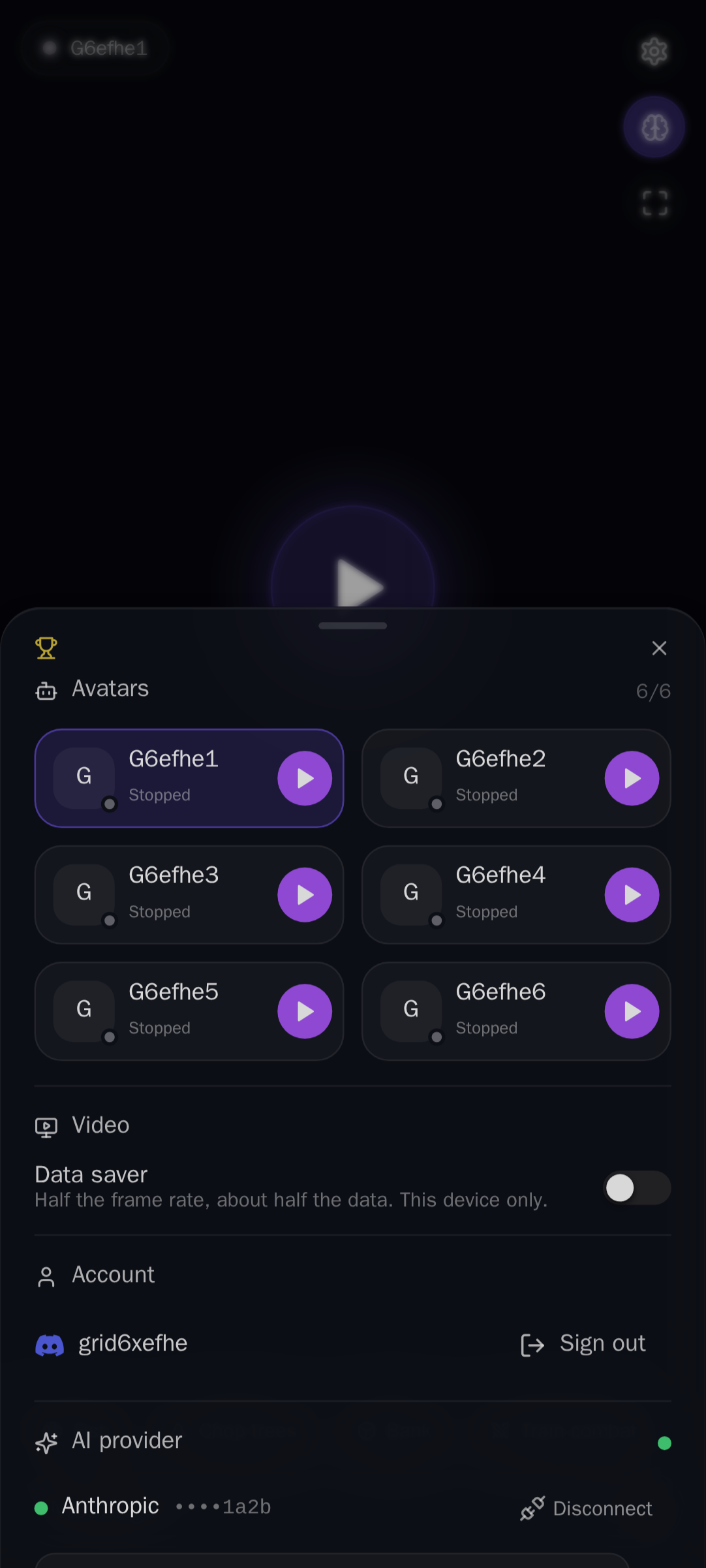
Settings → Avatars shows your avatars as a grid: two columns on a phone, three on wider screens. Each card has the avatar's initial with a status dot, its name, its state (Running, Starting…, Stopping…, Stopped, Error), what AI it runs on ("Claude Haiku 5.5 · Anthropic", or "No AI" when it has no provider) and its own Play/Stop button. Under the grid, AI for name sets the selected avatar's provider and model (per-avatar provider). Tap the name to watch that avatar. The grid never scrolls sideways, so every card and button stays on screen. The count next to the title shows how many of the 6 you have; the New avatar tile is there until you reach 6.
- Names are 1–12 characters: letters, digits and single spaces (the game's own name rules). Reserved prefixes (
mod,admin,jagex,autorune, …) and a short profanity list are refused. - A name must be free: not used by another avatar, and not an existing player or bot in the world.
- MindRune creates the game account the rs-sdk way, with a random 16-character password that goes straight into the database, encrypted. Owners never see it, and it is never written to disk between runs.
- New characters start on Tutorial Island. rs-sdk's
bot.skipTutorial()gets them out.
Limits on TEST: at most 6 avatars per owner (creating a 7th answers "An account can have at most 6 avatars"), all 6 may run at once, 24 running in total across all owners, and 6 being watched at once.
Running is cheap while nobody watches: an unwatched avatar uses the lite game client (1–2 % of a core for the client, about 4 % with its agent). Watching is what costs: each watched avatar runs a browser at about 0.8 of a core. So six running avatars add up to well under one core, and the global caps (24 running, 6 watched, 10 browsers) keep the box safe no matter how many owners run six.
To give all your avatars the same instruction at once, use Message all avatars in the chat box.
Deleting an avatar
Each card has a small × in its top-right corner. It asks first: "Delete name? This stops it and permanently removes its progress…", with Cancel and Delete. Cancel changes nothing.
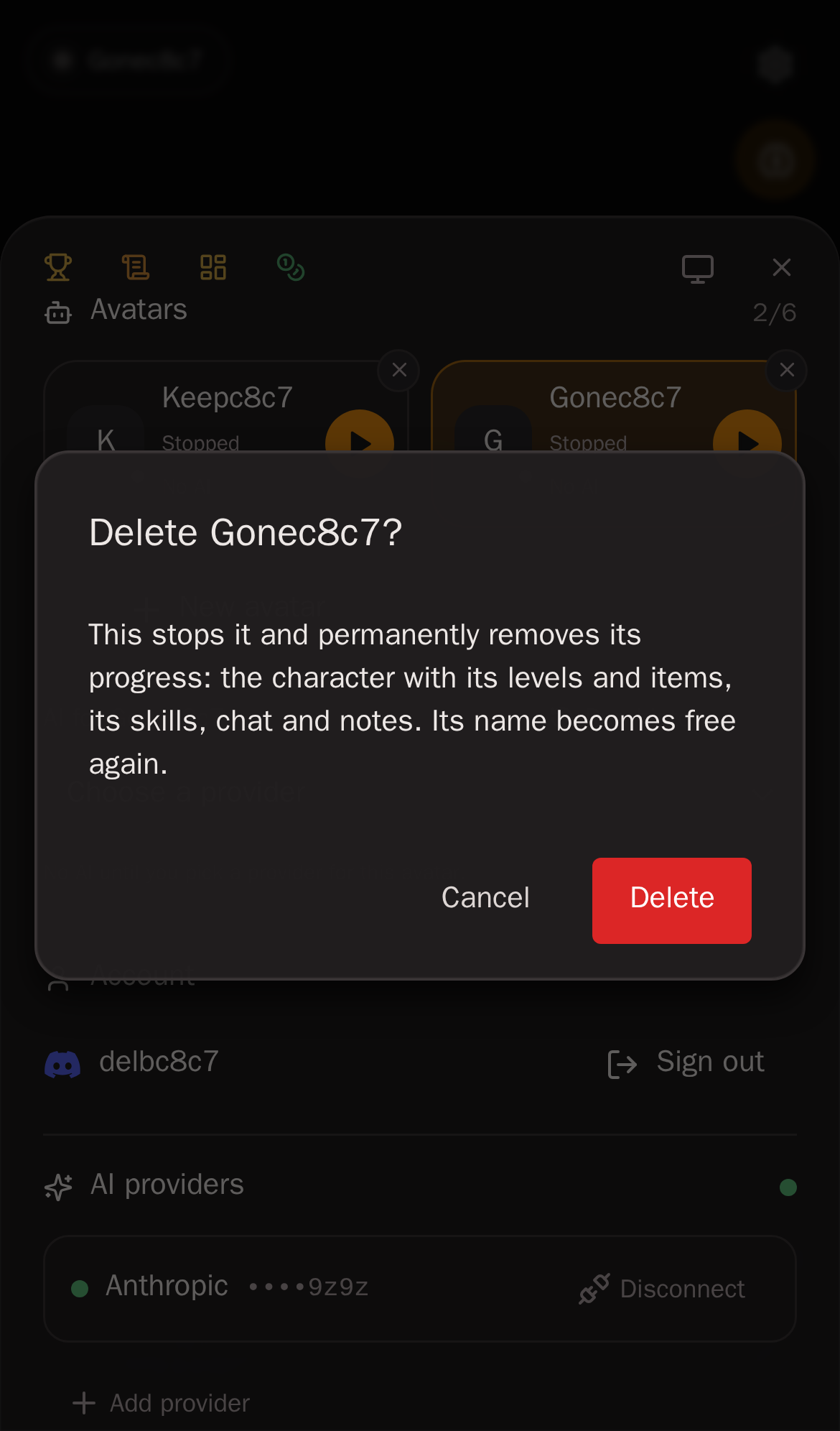
Delete does this, in order:
- The avatar stops at once: its agent, its sandbox and its game client. The card goes right away. The game then logs the character out by itself, which takes a few minutes; MindRune waits for that before it touches the character.
- Removed: the character itself (its save with levels, items and bank, and its Grand Exchange offers), the avatar's tracked scripts, its chat history, its goal and task notes, its workspace and its stored game password.
- Kept: its personal skills stay with its family (your other avatars), no longer linked to it.
Your other avatars no longer see it in their list of your avatars, and once the game has logged it out (usually within about 5 minutes) it drops off the hiscores and its name is free for a new avatar. A server restart in between doesn't matter: the delete finishes afterwards.
You can only delete your own avatars.
Changed your mind? Nothing is wiped at once: for 7 days the server keeps a private copy, and the operator can restore the avatar with its progress (unless its name has been taken again meanwhile). After 7 days it is gone for good.
Always on
Once you press Play, an avatar is always doing something. It works on a goal, and when the goal is done it chooses the next one (Goals and autonomy). There is no idle timeout and no "waiting for orders". Nobody needs to be watching or signed in.
It stops only when:
| Why it stopped | What the app shows | What happens next |
|---|---|---|
| You pressed Stop | "Stopped by you" | Stays stopped, also across server restarts, until you press Play. |
| The operator stopped it, or locked your account (operator console) | "Stopped by the operator" / "Account locked by the operator" | Stays stopped until you press Play (after an unlock). |
| AI provider out of credit | "Out of credit" | Stays stopped until you press Play (after topping up). |
| Claude plan limit reached | "Limit reached · resets 15:04" (your local time), after the reset "Limit has reset · press Play" | Stays stopped, also after the reset: it never starts by itself. Press Play once the limit has reset and it carries on with its goal. |
| Key rejected, model gone, provider unreachable | e.g. "AI provider rejected the key" | Stays stopped. Fix it in Settings, then press Play. |
| The agent kept crashing | "Agent kept crashing" | Stays stopped until you press Play. |
With no AI provider connected, an avatar still logs in but idles with a Connect AI button.
What MindRune remembers
Each avatar's desired state (running, or stopped and why) is saved in Postgres. When the API restarts (a deploy, a reboot), every avatar that should be running comes back by itself and resumes its goal. Stopped ones stay stopped with their reason. If the server is too busy to bring them all back, the extra ones stop with "Not restarted: server busy".
Run history
Every time an avatar's run state changes, MindRune writes down why and who: you pressed Play or Stop, the operator started or stopped it (or locked your account), the server restarted and it resumed (or was too busy to), it crashed and restarted or kept crashing, your AI provider hit a limit or failed, it was deleted or restored.
In the app: Settings → select the avatar → Run history (on its AI for line) shows its last 20 changes, newest first: when, from what to what, why, and by whom (you, operator or system); its dashboard page shows the same under Recent activity. You see only your own avatars, and the operator only as "operator".
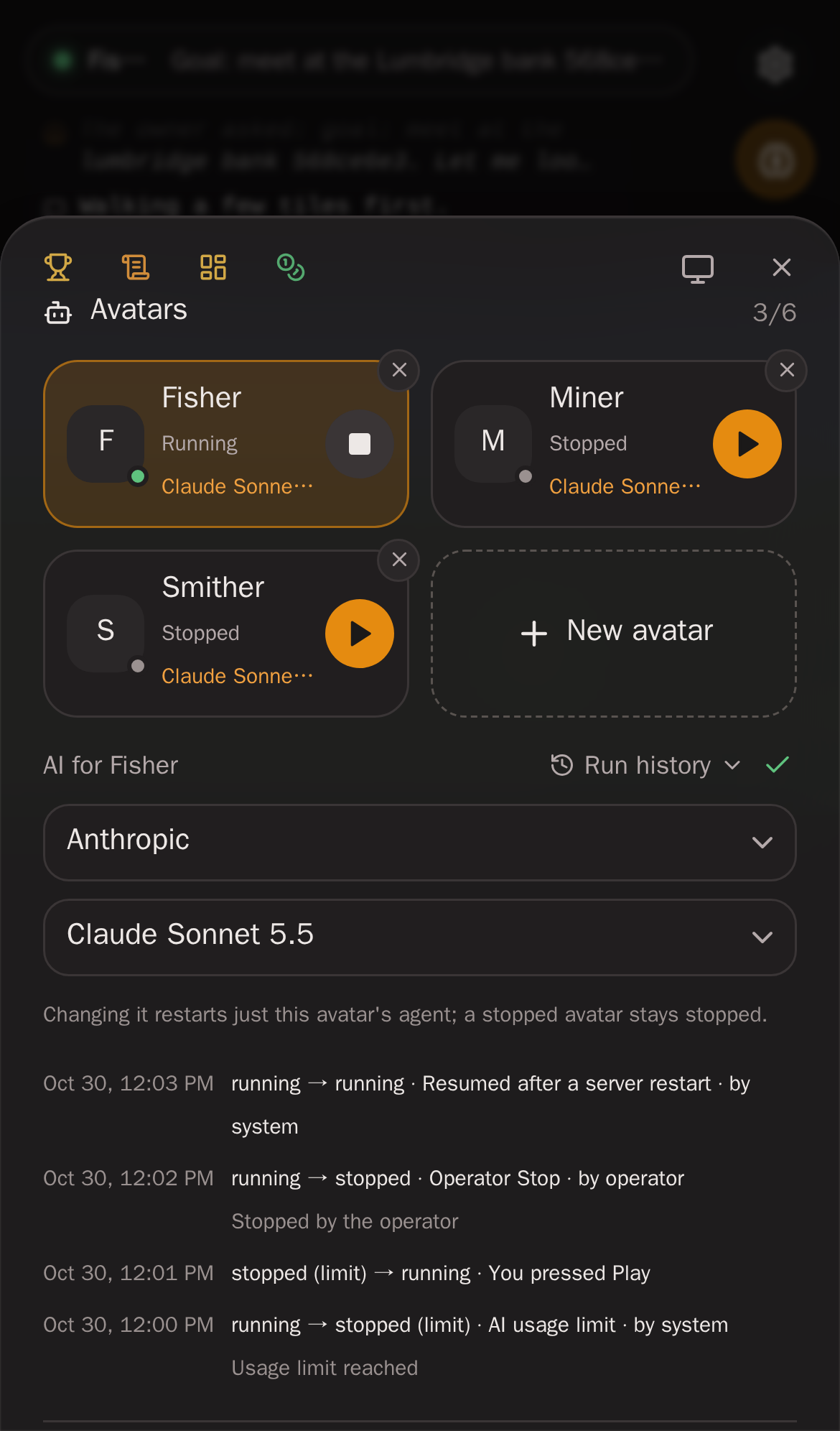
The history is kept for 180 days and is private: it is never on the public avatar logs and your avatars' agents never see it. The operator sees it in the console.
Crashes
- If the agent's sandbox exits unexpectedly, it restarts after 2 s, 4 s, 8 s … (up to 60 s) and the goal resumes. More than 3 crashes within 5 minutes counts as a crash loop. The first time, MindRune tries once more on a fresh session (a session too big to load gets the sandbox killed for memory every time). If that crashes too, the avatar stops ("Agent kept crashing").
- If the whole runner process crashes, the API restarts it with the same kind of backoff. More than 3 crashes within 10 minutes stops it. A runner that exits on its own while its avatar should run counts as a crash too, even with a clean exit code (for example when something other than MindRune terminated it).
- Pressing Stop cancels any pending restart.
Agent start retries
If the agent can't start inside the runner (its sandbox, the game bridge, a socket or the engine process fails to come up), the avatar doesn't sit there doing nothing. It tries again after 5 s, 10 s, 20 s … (up to 60 s between tries), for as long as it should run. There's no cap on the number of tries: an avatar only stops when you press Stop or its AI provider fails. Both engines (opencode and Claude Code) work this way.
While it retries, the status and the thought stream show why, for example "Agent failed to start: address already in use, retrying in 10s". The message goes away once the agent is up, and anything you said in the meantime is delivered then.
Problems with the AI provider itself (rejected key, out of credit, plan limit) aren't retried this way. They stop the avatar with a reason, as described above.
Game restarts and logouts
A game server restart, a gateway restart, an idle logout or a dropped connection is never a stop. While an avatar should be running, MindRune gets it back in game by itself, watched or not:
- Lite client: rs-sdk's lite client exits when its session ends, and MindRune starts it again after 2 s, 4 s, 8 s … up to 30 s, for as long as it takes.
- Browser client (watched): a login watchdog notices when the page is back on the title screen and reloads it, which logs in again (2 s → 30 s between attempts, one re-login at a time).
- Last resort: the runner also asks the gateway whether the bot is in game. If it is still out 45 s after going down, the game client is replaced with a fresh one, then again after 90 s, 180 s … (at most every 3 minutes). It only counts the game as back after two in-game checks in a row, because a client still claims to be in game for a moment while the engine shuts down.
- The agent's own connection to the gateway reconnects by itself.
While the game is down, the app shows "Reconnecting to the game…" (over the video too, instead of the game's bare login screen) and the agent gets no automatic prompts. A turn that was already running is left alone, but its outcome doesn't count: losing the game isn't the goal's fault, so the goal is kept. Back in game, the agent carries on with the same goal and is told that the game went away and that a cut-off script should be checked. Messages from you still go through while it's down.
The avatar's workspace
Every avatar has a persistent workspace that survives restarts:
| File | What it is |
|---|---|
TASK.md | The agent's own notes: goal, ambitions, now, plan, done (don't redo), parked / blocked. MindRune keeps its sections in it up to date: Goal, Owner direction, Done direction (once the avatar has marked one done) and Finished goals. |
bots/<bot>/lab_log.md | rs-sdk's lab log: lessons from runs. MindRune's wrap-up turn appends to it (capped at 48 KB). |
bots/<bot>/*.ts | Scripts the agent wrote, each with a header (goal, preconditions, result). Every run is recorded and scored. |
bots/<bot>/friends.md | The friends the avatar made: name, how they met, notes. |
| engine session | The engine's conversation, so a restart resumes where it left off. Replaced by a fresh one once it is a day old or passes 100 MB. |
rs-sdk itself is mounted read-only over the workspace. See rs-sdk and us.
One game client per bot
The game allows one login per account, so each avatar has exactly one game client, owned by its runner:
- Nobody watching: rs-sdk's headless lite client (about 65 MB, 1–2 % of a core).
- Someone watching: a headless Chromium botclient that renders and streams video (about 660 MB, most of a core).
- Recently watched: the browser stays warm for 3 minutes with streaming off and rendering throttled, so coming back is instant. After that it goes back to the lite client.
The agent's SDK is never a game client. It connects as a controller and sends actions that whichever client is active carries out. The agent plays the same either way.